Firmware
2014-08-14 10:01:42
COWON X9 Firmware V2.12
COWON X9 Firmware V2.12
POINT
Warning/Caution
The battery must be fully charged before upgrading firmware.
Do not press the reset button during upgrading.
Backup any important files from COWON X9 to your computer before upgrading.
You must upgrade the supplied firmware from COWON SYSTEMS.
Note
JetAudio programme(http://www.jetaudio.com/download/) is helpful in converting files into X9 supporting
formats, codecs and in ripping.
formats, codecs and in ripping.
EDIT
Improvements
No device¡¯s stopping when it is about to play not supported FLAC files
DOWNLOAD
Firmware Download
COWON X9 Firmware V2.12 Download
UPGRADE INSTRUCTIONS
How to Install X9 Firmware V2.12
Please read notes before install the firmware.
1. Please back up your data.
2. Please make sure the battery is charged enough for upgrade.
3. Please do not press the reset button the device while it is upgrading.
4. Please make sure you are disconnecting device with "safely remove hardware" for safely disconnect
your device and PC.
your device and PC.
1
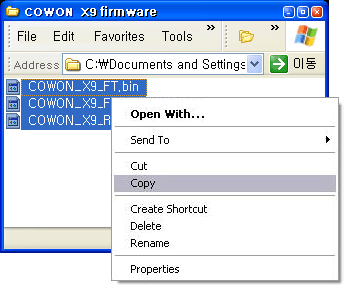
Download the firmware file in your PC and unzip it.
2
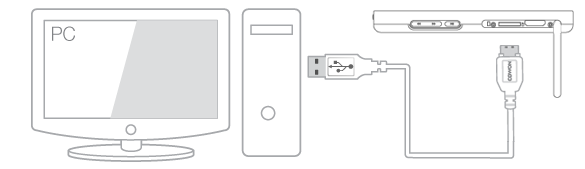
Connect COWON X9 to PC via USB cable.
3
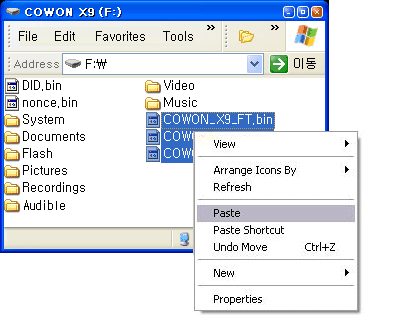
Copy and paste the firmware file to the root folder of the device.
4
Click ¡°safely remove hardware¡± icon in the tray at the lower right corner of your computer screen to disconnect the device from the PC.

5
Please check Settings > System > Information to firmware upgrade is done correctly.
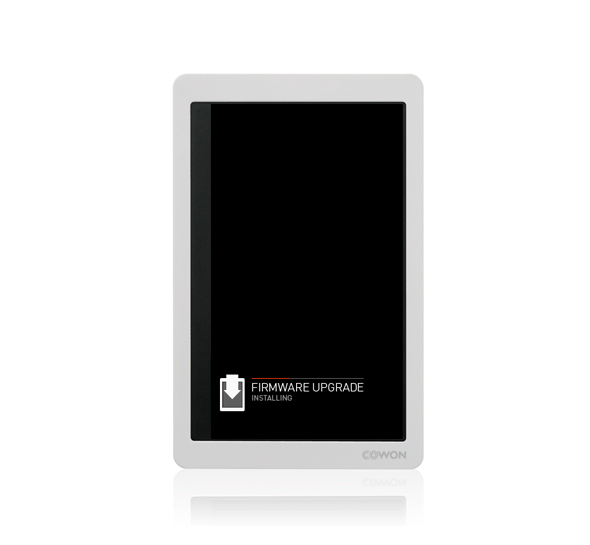
You can check firmware version on Settings > System > Information.