Firmware
2017-01-04 19:04:44
COWON Z2 Firmware Vx.47
COWON Z2 Firmware Vx.47

Warning/Caution

Back up any important data before the firmware upgrade.
Please remove MicroSD card before the firmware upgrade.
Please make sure the AC adapter is connected while upgrading firmware.
Do not turn the player off before the firmware update has been completed.
It may damage the product, and will be void any warranty.


Fixed the initialization issue when set the date on 2017.
< Tips for using Z2 in a more stable way >
Apply the following order to use the product more stable.
- Copy important data to a PC or other storage devices.
- Firmware upgrade to Vx.47
- After upgrade.
Settings > Storage > Unmount internal memory > Format internal memory > FAT32 > Erase
everything
Note: To play the file size of more than 4GB, it must be formatted as NTFS. Since NTFS characteristics,
after transferring the data, please run safe-removal before disconnecting the cable from the PC,
or files may be destroyed. Therefore if you use NTFS, special attention is required.
We recommend you to use FAT32, if you use standard media files.
after transferring the data, please run safe-removal before disconnecting the cable from the PC,
or files may be destroyed. Therefore if you use NTFS, special attention is required.
We recommend you to use FAT32, if you use standard media files.

2.xx, 3.xx and 4.xx firmware version are integrated to 4.xx.
The firmware version will be displayed as 4.47 after the firmware upgrade.
COWON Z2 Firmware V4.47 Download

* Please check version of firmware on Settings > About Z2 > Firmware version


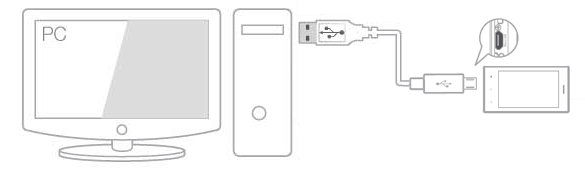
Use the USB cable to connect COWON Z2 to the PC.

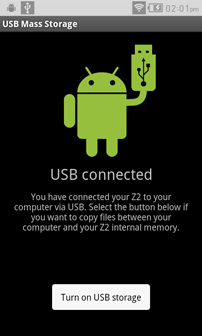
Select Turn on USB storage to copy files between PC and Z2.

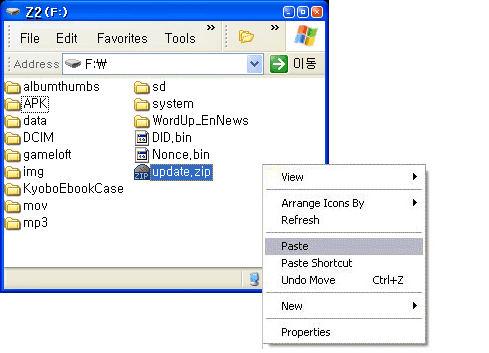
Copy and paste the firmware file to the root folder of the device.

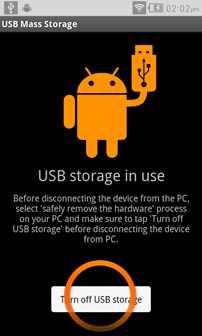
Click "Safely Remove Hardware" icon in the tray at the lower right corner of your
computer screen to disconnect the device from the PC.


Select Turn off USB storage and disconnect Z2 from PC.

Connect AC adaptor with your device.

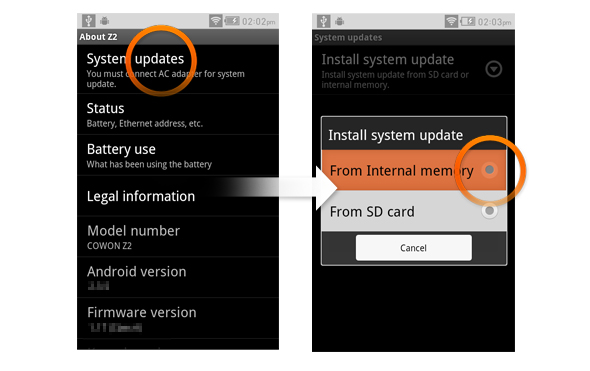
Settings > About Z2 > System updates, select the storage where the file is saved to start
firmware upgrade.
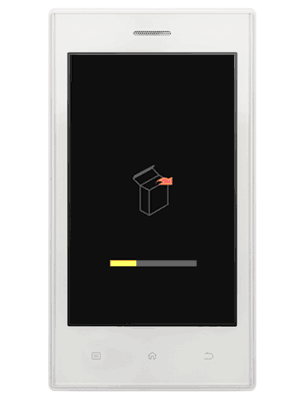

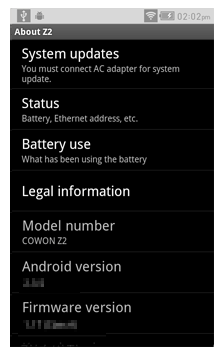
Upon finishing firmware upgrade, verify the installed firmware version from Settings >
About Z2 > Firmware version.
Firmware upgrade can also be conducted through MicroSD cards by copying firmware
files to the root folder of MicroSD and inserting the MicroSD card into COWON Z2.