Firmware
2017-05-16 10:47:54
iAUDIO E3 Firmware V1.07
iAUDIO E3 Firmware V1.07
POINT
Warning/Caution
Please keep in mind that all the settings and favourites will be initialized after firmware upgrade.
The battery must be fully charged before firmware upgrade.
Do not press the power button of iAUDIO E3 during firmware upgrade.
Backup any important files to your computer before upgrade.
Do not use any kind of firmware which COWON Systems, Inc. does not provide.
EDIT
Improvements
Improved the stability
When playing the music which playtime is more than 10 minutes, fix the bug of showing the information
on screen
on screen
DOWNLOAD
Firmware Download
iAUDIO E3 Firmware V1.07 Download
UPGRADE INSTRUCTIONS
How to Install iAUDIO E3 Firmware V1.07
Before you install the firmware.
1
Download the latest firmware file and save it on the hard driver of your PC. After saving the file, please unzip the file.
2
Please unzip the file. E3_FW.HEX file will be created after unzipping.
3
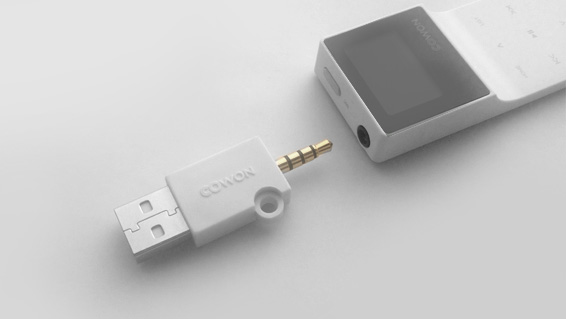
For firmware upgrade, connect your iAUDIO E3 directly to the USB port of your PC with the included cable in the package.
4
The battery of a device should be fully charged
1
Download the firmware to your PC and unzip it. ¡®E3_FW.HEX¡¯ file will be created.
.jpg)
2
Connect iAUDIO E3 to the PC by USB cable and wait until your computer recognizes iAUDIO E3 as a removable disk.
3
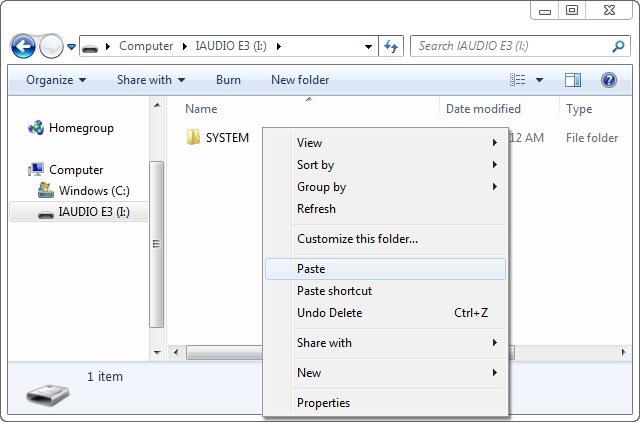
When iAUDIO E3 is recognized as a removable disk, paste the ¡®E3_FW.HEX¡¯ file to the root folder of iAUDIO E3.
.jpg)
4
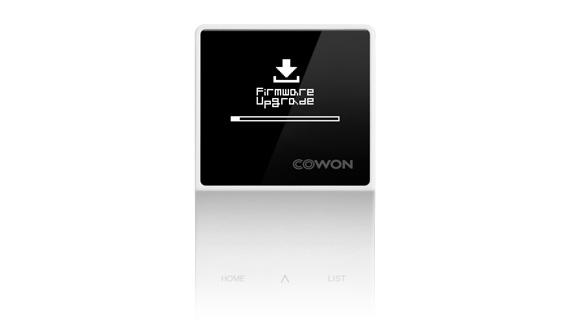
When file copy is done, disconnect USB connection and turn on iAUDIO E3. Firmware upgrade will begin with a progress bar on the screen. The device will be turned on when firmware upgrade is completed.
5
Please set the language and the region. To check the firmware version please go to Setting> Information.